Broadband Usage Meter Features
Monitors your live broadband usage as you surf, so you don’t cross your ISP’s monthly limit. Also provides broadband speed right on your desktop.
Download
Broadband usage meter is a desktop utility that enables an internet user to monitor live his broadband usage,
so he keeps within his ISP’s broadband usage limit for a definite period. It also offers desktop broadband speed.
It dispenses away with the need to visit your broadband service provider's website for checking the
broadband usage now and then. It dispenses with the need to login to broadband provider's website.
Live broadband usage meter is a standalone desktop meter, which calculates locally your internet data transfer.
It is live all the time!
It's free! Also provides broadband speed right on the desktop.
Monitor your bandwidth usage as you surf, so you don’t cross your ISP’s monthly limit.
Broadband Usage Meter Features:
Installing broadband usage meter:
Using Broadband Usage Meter:
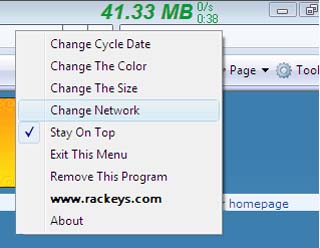
Broadband Usage Meter will stay on your desktop and can be dragged anywhere.
FAQ:
Is Broadband Usage meter compatible with every ISP?
Yes, Rackeys broadband usage meter is compatible with every ISP around the world.
Will it work on landline broadband, or mobile broadband?
It works with both landline, and mobile broadband.
Will it consume my bandwidth during its live functioning?
No it will not consume any bandwidth for its own functioning, since it doe not send or receive any information through the internet.
Can I change its color?
Yes you can change the bandwidth usage meter’s color, from its color palate.
Is Rackeys broadband usage meter difficult to install?
No, it is very easy to install. After downloading, when you double click the icon, the program will be installed automatically.
Do I have to log in to any website, or does it need any passwords?
No, you do not have to log in to any website, or create a username/password. It is a standalone desktop meter, which calculates locally your internet data transfer. You don’t have to go to any website to see your records. It is live all the time!
Will it give internet speed and monthly stats?
Yes
Can I make the broadband speed measuring digits larger?
Yes, simply go the menu and press shuffle - this will turn the speed digits bolder than the usage digits - pressing shuffle again will bring the software back to the prior status.